How AstroMatrix explains what it already does
I walked the three central intentions on the production app as a new user, Sam, with a partner, Alex: understand myself, understand what's happening in my life, understand my relationships. For every screen I recorded only what the screen itself says. I checked the code before calling anything absent, and I used customers' own messages and the Discord results as the measure of what people understand and want.
AstroMatrix has one coherent engine, and it never tells people that. The Matrix covers areas of life, read through a lens. The self lenses are birth, transits, this week, this month, progressions and draconic; for two people they are synastry and composite. That single engine is the bridge between "myself", "my life now" and "my relationships". In code, Birth Report, Transits, Weekly, Monthly, Progressed and Draconic all open the same Matrix screen. On screen, people meet it under six names, plus a seventh vocabulary in its own selector, and nothing says they are the same tool.
At each stop, the first thing people see is the part the app explains least: a glyph wheel, unlabelled scores, a radar. The parts that work are one or two taps down. Those are the personal readings, transit windows with dates, and relationship readings that name whose planet is whose. The explanations exist too, in three places: help text, tappable trait tiles, and the Guide glossary. But they aren't connected to where the questions arise, and some describe screens that no longer exist.
So the answer to "why does it feel like it's missing things it has" is mostly order and explanation, not missing capability and not navigation. That matches what the earlier research found: the Matrix itself is well received.
Journey 1 · Understand myself
The path: birth chart → Matrix → relevant interpretation → deeper techniques.
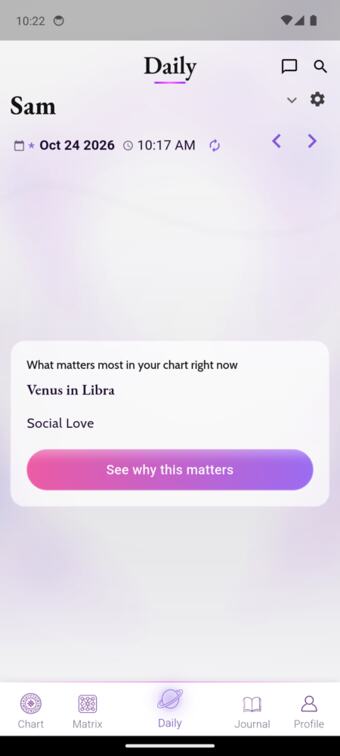
First screen after sign-up
One card: "What matters most in your chart right now: Venus in Libra · See why this matters." It opens Venus in Libra (Oct 25 – Dec 4), a sign change that is the same for everyone, written in general terms. It doesn't mention Sam's chart.
breaksThe first promise about "your chart" is answered with something that isn't about your chart. The design's own rule (FEATURE-15) is to exclude items "identical for every account", but its filter only removes Moon items, lunations and the monthly horoscope. Planets changing sign get through.
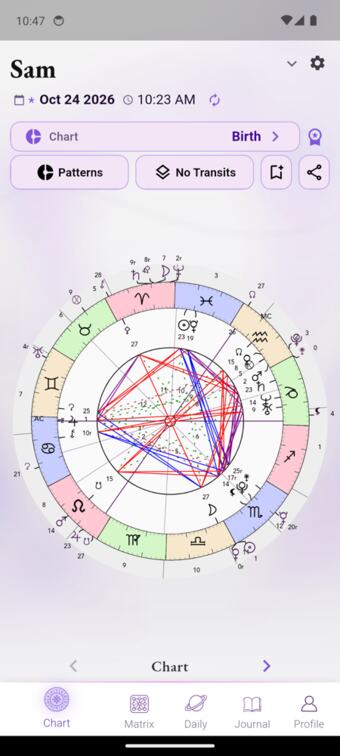
Chart tab
A wheel of planet and asteroid glyphs, aspect lines and degree numbers. It has no words, and tapping it does nothing: the tap handlers belong to the table pages, not the wheel. The meanings sit on page 2 ("Planets") and page 3 ("Aspects"), behind a small "‹ Chart ›" pager. The chart-type list offers ten technique names with no line saying what any is for.
breaksThe most recognisable astrology screen explains nothing on its own.
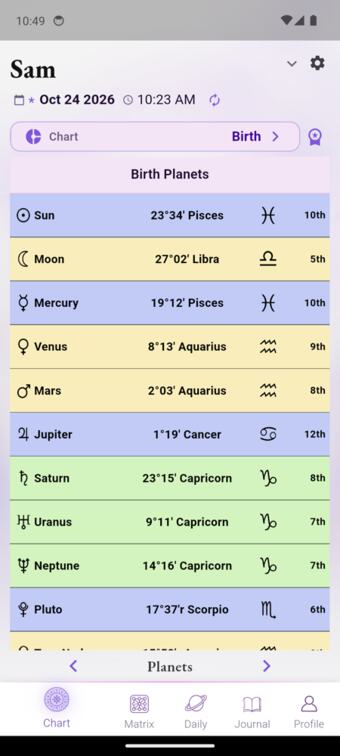
Chart › Planets
Each cell opens a piece. "Sun" opens the Sun in general, "Pisces" opens Sun in Pisces, and "10th" opens Sun in 10th House. The combined reading, Sun in Pisces in 10th House, is not here; it lives in the Matrix.
partlyAccurate, but the reader has to put their Sun together from three parts.
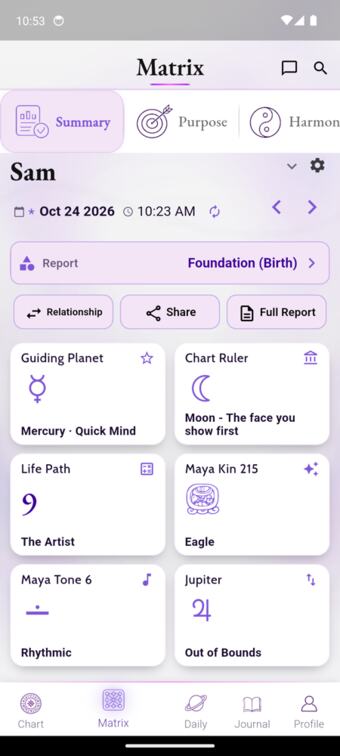
Matrix › Summary
Six tiles open the page: Guiding Planet, Chart Ruler, Life Path 9 (numerology), Maya Kin 215 · Eagle and Maya Tone 6 (Mayan calendar), and Jupiter Out of Bounds. Three systems sit side by side with nothing saying they are different systems.
The Summary rows
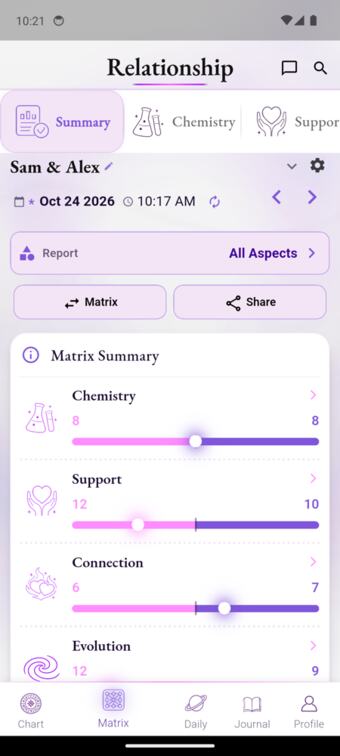
Each row shows a pink number, a purple number and a dot, with no legend. In code they are the counts of challenging and supportive aspects in that area. The ⓘ help explains philosophy ("The matrix is not a verdict; it is a mirror"), not how to read the row. It also speaks of "fifteen dimensions" while the screen shows five rows.
The labels do exist one level down ("Path & Career · Success 7 · Obstacles 3"), but in the opposite order: supportive first there, challenging first on the Summary.
breaksThis is the most consistent comprehension complaint in support. Seven people since July, the latest today:
"under purpose it says 7 on one side (pink) and 14 on the other (purple) with the dot on the purple side. how do I make sense of this?" (Oct 22)
"How do I use the new matrix feature in your app? Is there a feature to explain that?" (Oct 24)
A category (Purpose)
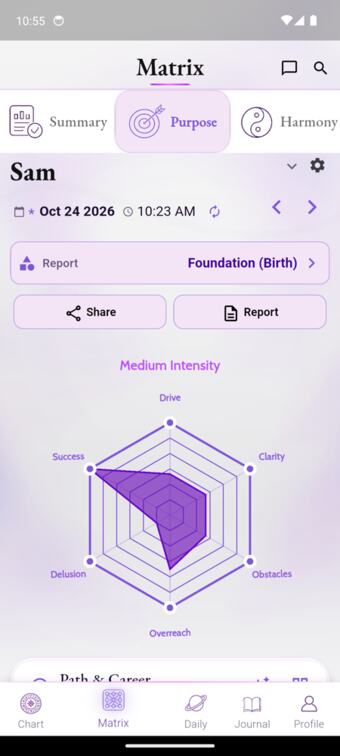
The radar's six axes alternate supportive and challenging: Drive, Clarity, Obstacles, Overreach, Delusion, Success. So a bigger shape is not a better one. "Medium Intensity" is never defined. On the relationship side a visibly larger composite shape is labelled "Low Intensity".
breaks"I don't understand how to read the… radar charts, can you… direct me to where I can learn" (Oct 16).
A reading (Sun in Pisces in 10th House)
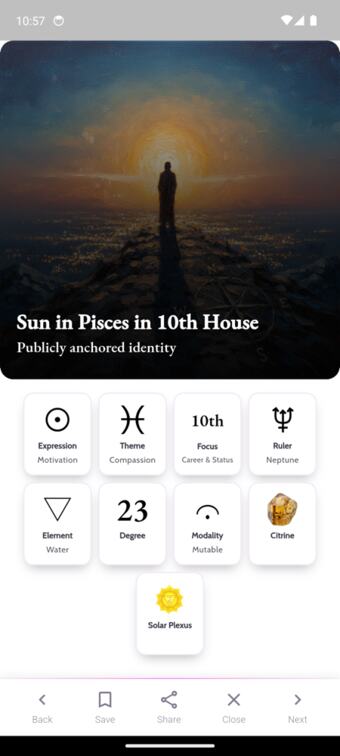
The best "understand myself" content in the app. It's personal and combined: themes, opportunities, challenges, an affirmation and several paragraphs about this placement. The tiles at the top (Focus 10th, Ruler Neptune, Element Water) each open a plain explanation. Tapping "10th" explains the 10th house in everyday terms.
worksbutThe tiles look like data, not buttons, so the in-context learning path is invisible. The next step offered is "Next", which means the next item in a list. There's no link to this placement on the chart, to what's activating it now, or to how it plays in a relationship.
Deeper techniques: the "Report" selector
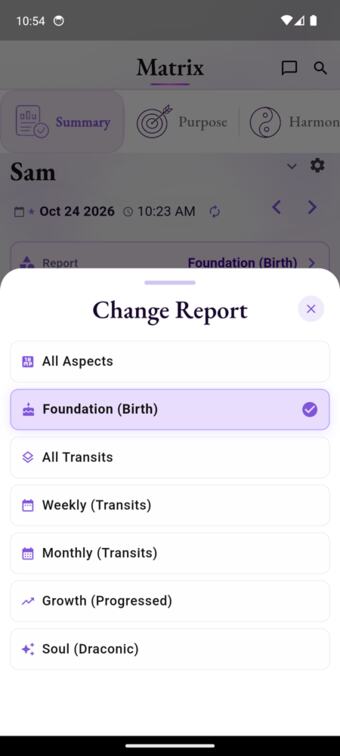
This is the clearest bridge to deeper astrology in the app, with plain names first: Foundation (Birth), Growth (Progressed), Soul (Draconic). But it's labelled "Report", and switching changes every score without a word (Purpose goes from 8·13 to 0·3 on Growth). The Guide has entries for Progressed Chart, Draconic and Solar Return, but nothing links to them from here, from the chart-type list, or from tiles like "Time Lord".
partlyThe structure that would let people go deeper exists; nothing says what it is.
Can they find it?
Mostly. Chart and Matrix are tabs.
Can they understand it?
The readings, yes. The wheel, the scores and the radar, no: those are what people see first, and what they write in about.
Can they use it to go further?
Only by luck. Each reading is a dead end except "Next in list"; the explanations aren't signposted.
Journey 2 · Understand what's happening in my life
The path: Daily → current transits → weekly and monthly timing → a personal interpretation.
Daily
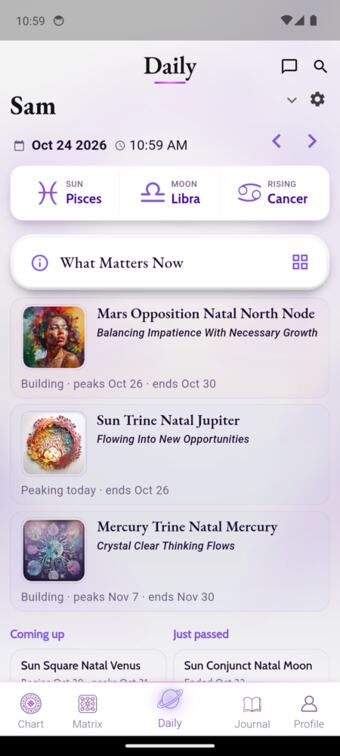
About 80 lines across a dozen sections. Personal items (What Matters Now, Coming up / Just passed, Moon Transits) are interleaved with sky-wide ones: Moon phase, Lucky Number, Planetary Hour, Void of Course, Important Events, Short Term Forecast, Retrogrades, Out of Bounds. Nothing marks which items are about you and which are about everyone. Retrogrades, the most-used Daily item in your poll (11 of 27), sits about six screens down.
The explanation of Daily
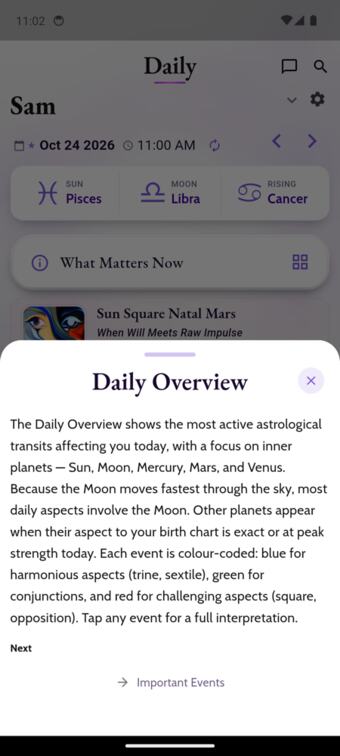
The ⓘ on "What Matters Now" opens "Daily Overview": "Because the Moon moves fastest… most daily aspects involve the Moon." The section actually shows multi-week personal transits ranked by peak, with no Moon items. The help for "Important Events" describes what What Matters Now does ("highest-priority transits in your chart"), while the Important Events section lists sky-wide events. The help library has about 50 Daily entries, many for sections the current Daily no longer has (Daily Horoscope, Weekly Horoscope, Long Term Themes).
breaksThe explanations exist, but they describe a different screen.
A personal transit (Sun Square Natal Mars)
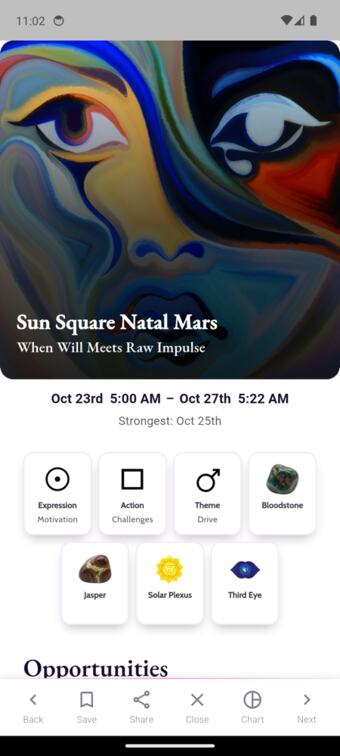
It works well. It has a dated window (Oct 23 – 27, "Strongest: Oct 25th"), a plain explanation of what this means for you, and practical guidance ("slow your decision-making… frustration is diagnostic").
worksbutNothing connects it to the natal Mars it touches, even though Sam's "Mars in Aquarius in 8th House" reading exists in the Matrix.
"See all my current transits"
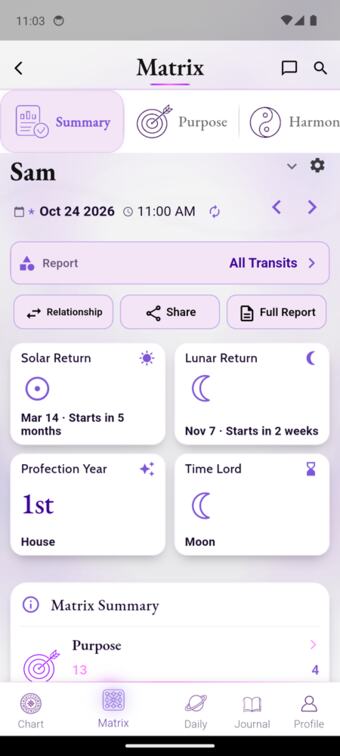
It doesn't list transits. It switches to the Matrix with "All Transits" selected and shows five category scores, plus Solar Return, Lunar Return, "Profection Year · 1st House" and "Time Lord · Moon". The list is one level down, split by category. The Matrix then stays on All Transits, so the next "understand myself" visit shows transit scores.
breaks"I just want to read through my transits in order… Your new matrix system and how everything is divided up now doesn't make sense."
Weekly, Monthly, Progressed: the same screen under different names
Explore's "Weekly" and "Monthly" open the Matrix with a weekly or monthly lens: scores, then personal transit readings whose windows can run for weeks. Separately, Daily has an "October Monthly Horoscope", a sky-wide article about four screens down under "The Sky This Week". So "monthly" means two different things, one personal and one general, and neither says which. "Progressed" is a Matrix lens in Explore ("Growth (Progressed)") and a chart type on the Chart tab. No screen states how Daily, Transits, Weekly, Monthly and Progressed differ. They look alike because they are the same Matrix.
Can they find it?
Yes, Daily is the home screen, but its best items are buried in a long feed.
Can they understand it?
Individual transit readings, yes. How the timing views differ, no, and the help describes a previous design.
Can they use it to go further?
"See all" leads to scores, not a list in time order; readings don't link back to the natal placement.
Journey 3 · Understand my relationships
The path: the other person's chart → synastry → composite → relationship Matrix.
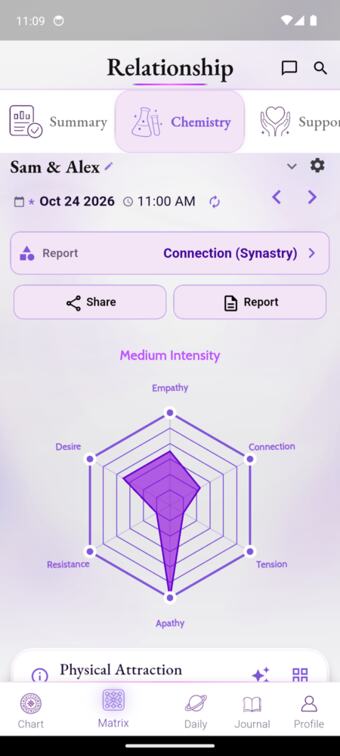
Relationship Matrix ("Love Match", or after adding someone in Manage Users)
The lenses use plain words: All Aspects, Connection (Synastry), Unity (Composite). Readings name whose planet is whose: "Alex's Mars in Sam's 11th House", "Sam's Venus Sextile Alex's Mars". Adding a person through Manage Users lands here directly.
worksThis is the clearest of the three journeys. The Summary has the same unlabelled numbers, and its help says "twelve dimensions" over four rows.
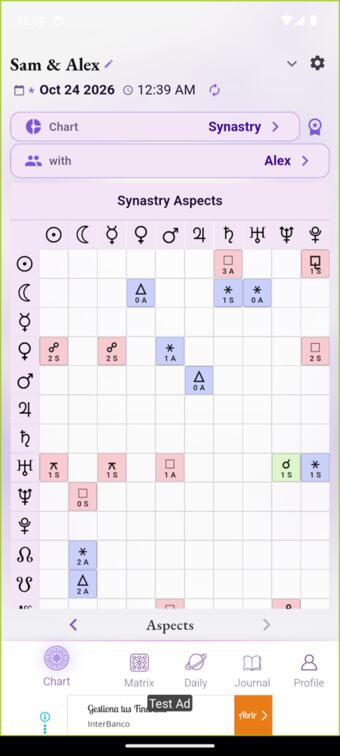
Chart › Synastry › Aspects
A grid of glyphs with no row or column labels saying whose planets are whose. Cells read "2 S", "1 A". In code (chart_service.dart:502) A and S mean applying and separating. Under a "Sam & Alex" header they read as Alex and Sam.
breaks"how do I know which person is who in the synastry chart aspects?" (Oct 3); "it would help… if the x and y axes were labeled user a and user b" (Oct 14).
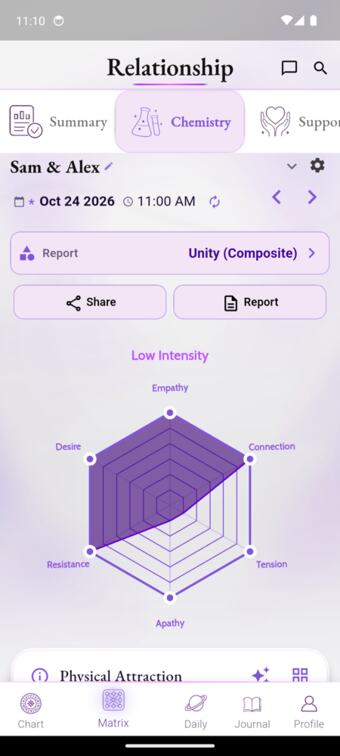
Composite
The readings are titled like personal placements ("Venus in Aries in 1st House · Socialite"), though neither person has them. The body text is clearly about "this relationship" and "the pair".
minorThe title framing misleads, but the content corrects it.
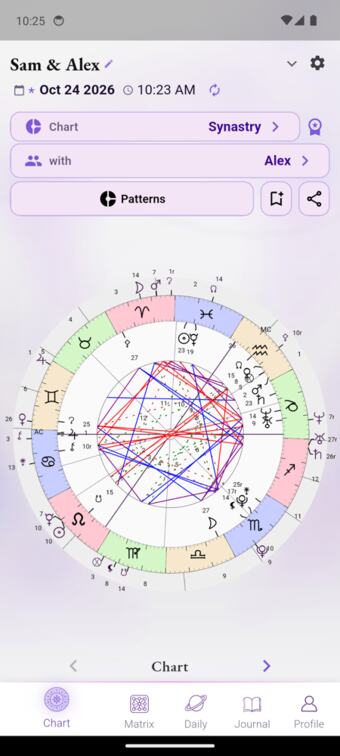
After the relationship, back to myself
Having added Alex, the Chart tab now opens on the Sam & Alex synastry wheel while Daily shows Sam alone. The Matrix keeps its last lens the same way. Mode carries silently across tabs.
breaksPeople lose their place between journeys without being told why.
Can they find it?
"Love Match" is a tile below the fold; Synastry is jargon on the Chart tab.
Can they understand it?
The Relationship Matrix readings, yes. The synastry grid, no.
Can they use it to go further?
The lenses connect synastry and composite well, but leaving the relationship leaves the app in relationship mode.
What users say they want, against what already exists
Poll results as you pasted them. "Exists" is checked on device or in code.
| They asked for | Votes | What already exists | What stands in the way |
|---|---|---|---|
| Guided self-discovery | 17 / 46 | Personal combined readings for every placement (Matrix), each with tappable term explanations | No starting point or order: the readings are filed under score categories, and the first layer is numbers |
| Lessons on your own chart · Visual mini-lessons · Guided walkthrough · Learn your birth chart | 20 / 64 · 22 / 64 · 11 / 30 · 9 / 25 | Guide glossary (signs, houses, planets, Terms incl. Progressed, Draconic, Natal Chart); trait tiles open plain explanations; help text per section | The Guide is general, not about your chart, and is reached only via Explore all. The tiles don't look tappable. The help is partly stale. The three aren't connected |
| Timeline | 7 / 25 | What Matters Now ranks by peak with begin, peak and end dates; each transit has a "Strongest" date; return countdowns; retrograde calendar (FEATURE-11, shipped) | "See all my current transits" goes to scores, and there's no single chronological list |
| Retrogrades · Tarot card on Daily | 11 / 27 · 8 / 27 | Both on Daily, plus a Retrogrades calendar | About six and three screens down a mixed feed |
| Ask Your Chart (AI chatbot) | 4 / 46 (last) | Not built | Not wanted, by this measure |
Where this lands
No new tickets. This is evidence for the ENABLE job in FEATURE-30 (Mark, 2026-10-24): "make the existing Matrix understandable and the Guide discoverable, without replacing the functioning navigation". The screens above say concretely what "understandable" has to cover, all of it existing functionality:
- What the two numbers and the dot on each Summary row are. The words already exist one level down ("Success · Obstacles"), in the opposite order.
- How to read the radar: alternating supportive and challenging axes, and what "intensity" means.
- That "Report" is a lens: changing it changes everything, and Birth, Transits, Weekly, Monthly, Progressed and Draconic are the same Matrix through different lenses.
- That the terms people meet (Progressed, Draconic, Profection, Time Lord, Synastry, Composite, applying and separating) already have Guide or help text, which isn't reachable from where those terms appear.
- That the Daily and Matrix help texts describe the current screens. Several describe a previous design.
Two existing records get a note, not a ticket. FEATURE-15: its own rule ("exclude items identical for every account") misses sign changes, so the first insight can be sky-wide. And the synastry A/S labels, as evidence for the existing synastry group (G11, ISSUE-484).
What this does not show
- I walked the journeys and recorded only on-screen text. I know astrology, so I did not judge comprehension myself. The comprehension evidence is customer messages: about 7 on the Matrix, 4 on synastry, 3 on transit order, 5 on learning and feeling overwhelmed (support, 2026-07-01 to 10-24).
- One guest account on the free tier, one chart, one partner, Android. Paid accounts weren't walked.
- It is not a newcomer usability study. It says where the product doesn't explain itself, not how many people that loses.